
Fynch - A Twitter Extension1.0.13 - Google Play
You'll be able to see results in few seconds.
Publisher Description
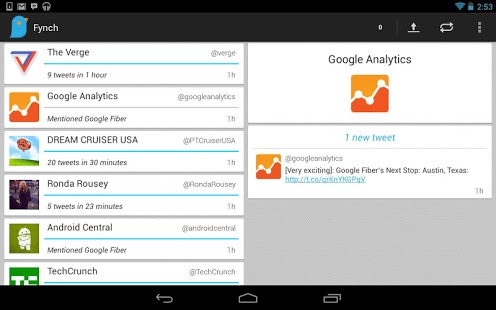
Fynch enhances your Twitter experience by automatically analyzing your timeline for interesting patterns of activity. It is intended to be a tool that decomposes your timeline into smaller sets of tweets that are easier to consume. Fynch is great for identifying extremely high rates of activity, trending topic mentions, and the tweets of less active users in your following list.
Keep up with all your friends, and even favorite celebrities, with Fynch’s unique data mining technology that compiles your timeline into three kinds of “Fynch’s”, for easy, organized access.
Interested in what one of your Twitter friends has to say? Tap the user’s “Fynch”, to unveil the group of tweets they have written. Want to go even further? Tap a Tweet that interests you and you will be immediately directed to your Twitter app for the favorite, re-tweet, and reply options.
FEATURES:
- Automatically analyzes your timeline for interesting patterns of activity.
- Carbon fiber holo theme.
- Google Now style cards.
- Expandable inbox style notifications (Jelly Bean+).
- Uses notification priorities (Jelly Bean+).
SETTINGS:
-Notifications ON/OFF
-High Priority Notification
-Configurable Tone
-Time Analysis Sample Rate
-Sensitivity
“Stay in-the-know with Fynch!”
REQUIREMENTS:
- A Twitter account.
- The official Twitter app or Falcon Pro if you want to reply to, retweet, or favorite a tweet.
About Fynch - A Twitter Extension
The company that develops Fynch - A Twitter Extension is Rn Software. The latest version released by its developer is 1.0.13.
To install Fynch - A Twitter Extension on your Android device, just click the green Continue To App button above to start the installation process. The app is listed on our website since 2014-01-18 and was downloaded 0 times. We have already checked if the download link is safe, however for your own protection we recommend that you scan the downloaded app with your antivirus. Your antivirus may detect the Fynch - A Twitter Extension as malware as malware if the download link to com.rn.fynch is broken.
How to install Fynch - A Twitter Extension on your Android device:
- Click on the Continue To App button on our website. This will redirect you to Google Play.
- Once the Fynch - A Twitter Extension is shown in the Google Play listing of your Android device, you can start its download and installation. Tap on the Install button located below the search bar and to the right of the app icon.
- A pop-up window with the permissions required by Fynch - A Twitter Extension will be shown. Click on Accept to continue the process.
- Fynch - A Twitter Extension will be downloaded onto your device, displaying a progress. Once the download completes, the installation will start and you'll get a notification after the installation is finished.
Program Details
System requirements
Download information
Pricing
Version History
version 1.0.13
posted on 2014-01-18
version 1.0.12
posted on 2013-06-13
Several fixes and updates
Disclaimer
Official Google Play Link
We do not host Fynch - A Twitter Extension on our servers. We did not scan it for viruses, adware, spyware or other type of malware. This app is hosted by Google and passed their terms and conditions to be listed there. We recommend caution when installing it.
The Google Play link for Fynch - A Twitter Extension is provided to you by apps112.com without any warranties, representations or guarantees of any kind, so access it at your own risk.
If you have questions regarding this particular app contact the publisher directly. For questions about the functionalities of apps112.com contact us.
